Showing posts with label Software Sites and Products. Show all posts

Java Dynamic Web Project to Maven 3 Project - Migration Steps


If you start a java project in eclipse as "maven project" at the beginning, all you need is downloading maven distribution or maven plug-in and add dependencies to the pom.xml file when required. But some issues exist while migrating from java dynamic web project to maven project. In this post, required configuration steps will be told. Maven introduction, installation, "repository" concept and maven commands are out of scope for this post.

  • Source codes for a maven project must be located in src/main/java folder. Also test and resources must be located in src/test/java and src/main/resources folders respectively. For this conversion, you can create required folders manually and copy old source codes in it, but more preferred and stable way is defining source paths in Project Properties --> Java Build Path section:

Source folder configuration

  • /WEB_INF folder is not used in maven projects. There is "webapp" folder instead. You can move WEB_INF files into webapp folder as the given structure  and delete old WEB_INF folder. You don't even need lib folder because maven will create required jars:
webapp folder


  • target/classes folder must be the output (deploy) path instead of build/classes. Again in Project Properties --> Java Build Path section:

Output folder


  • org.eclipse.wst.common.component file needs some changes. Open it using ctrl+shift+R and edit deploy path and output path as below:
org.eclipse.wst.common.component file
  • Create pom.xml file on project root folder and configure required sections with your project details. Then add required dependencies one-by-one between tags (This will be the most time consuming issue if there are tens or hundreds of JARs). If maven global repository has required jar, it will be downloaded automatically, otherwise you must find required jar and run "mvn install" command to install that jar to maven repository:
pom.xml file
  • Run mvn-install or mvn-package commands for the project. Created JARS, web.xml, other resources and class files will be located under /target folder automatically. Also a WAR file for the project will be created. You can copy WAR file to server (e.g. apache tomcat) and run the application, or you can run the application using the server defined in eclipse. 
target directory

  • Depending on the running style of mvn-install command (by plug-in, command etc.) , created JARs under the /target folder may not be copied to src/main/webapp/WEB-INF folder. If you will run the application using the server of the ide, you may be needed to copy created libs into src/main/webapp/WEB-INF/lib folder and add those libs to project using Project Properties --> Java Build Path --> Libraries --> Add JARs section for once.
Adding required jars under webapp/WEB-INF/lib

Posted in , | Leave a comment

A Selection of Successful Software Engineering Posts (2011)


This selection contains 25 blog posts selected by CodeBalance which were placed on DZone in 2011.

Java
Producer and Consumer Pattern in Java
Quick Tip for Improving Java Apps Performance
JUnit Tutorial 2
Clientside Improvements in Java 6 & 7
Java Productivity Report 2011 (India vs Rest of the World)
Be a Better Java Programmer - A Reading List
Method Size Limits in Java
Why I Choose Java?
Best Practices List in Java
Lessons in Software Reliability
Music Components in Java Effects
WWW: World Wide Wait - A Performance Comparison

Software Engineering & Practices
The Principles of Good Programming
A Detailed Study on Understanding Code
Making Better Software - Forget New Features
Making Code Easy to Understand What Developers Want
Things to Remember When Doing Code Review
The Seven Phases of Introducing Continuous Integration

General
The Most Important Man in Tech Dies Last Week…It wasn't Steve Jobs.
The Top 10 Attributes of a Great Programmer
Build Facebook Bot in 2 Easy Hours
30 Free Programming E-Books
Signs That You're a Bad Programmer
A Complete List of All Major Algorithms (300)
10 Android Articles/Tutorials


Posted in , , | 1 Comment

Hibernate 3 Installation & Configuration


Short Description:
Hibernate is an ORM framework for Java applications, which maps application objects into relational database tables. It is important because:
  • Developers don't write SQL expressions into code. This saves time and increases maintainability.
  • It is database independent. DBMS can be changed without changing the code. Only configuration XML is modified for this.
  • It supports transaction methods and auto-creation of tables, constraints, relations (1-N,1-1, N-N, etc.).
Installation:
Requires two steps:

  1. Copying required JARs into /lib directory:
  2. Creating and configuring persistence.xml configuration file.
Required JARs are: 
Hibernate installation JARs
Hibernate requires only hibernate3.jar. But hibernate-jpa jar is also used generally for additional JPA properties. A database connector jar is also reqiured for connection handling. mysql-connector jar is used here for this reason. Other jars are required because of dependencies. These jars can be found on most Java developer download site with exact version numberings.

persistence.xml file is also required to map application into database. Database configuration is done in this file. It is put into /src/main/config/META-INF folder as default. Content should be as below:


Hibernate persistence.xml configuration

  • persistence-unit name: Defines the configuration id. More than one persistence unit can be defined at once.
  • hibernate.connection.driver_class & hibernate.dialect: Defines the database type. MySQL is used in this example.
  • hibernate.connection.username & hibernate.connection.password: Defines database connection parameters.
  • hibernate.connection.url: Defines database server name, port and schema. "test" is used here for schema name.
These two steps are required and enough for starting Hibernate usage. Hibernate entity definition and API usage will be explained in upcoming posts.

Posted in , , | 3 Comments

A Quick Reference to the Spring 3 DI Bean Configuration


Spring 3 DI (dependency injection) functionality which placed in "Spring Core" is very important for managing objects (or "beans") in enterprise applications.


Here is a quick reference for bean configuration of Spring DI:

Spring Bean Configurations 


You can get a bean in application by

manual:
ApplicationContext context = new ClassPathApplicationContext(new String[] {“application-context.xml”})
ViewManager viewManager = (ViewManager)context.getBean(“viewManager”);

annotation:
@Autowired
ViewManager viewManager;


Posted in , , | 1 Comment

Develop Rich Web Applications with Java by Vaadin Framework (Introduction)


Vaadin (http://vaadin.com/home) is an open source web application framework having a server-side architecture which constructs user interface of web applications as RIA (rich internet applications), using Java code only.

Vaadin Logo

For developing Vaadin applications, you only use Java code, like Java Swing. This Java code is then converted to GWT (Google Web Toolkit) components (which are HTML and Javascript based) for browser side, and AJAX code sections are generated for some actions to support RIA concept. Server side validation is also performed for all actions.

An example source code is shown below:

  
import com.vaadin.ui.*;

public class HelloWorld extends com.vaadin.Application {
    public void init() {
        Window main = new Window("Hello window");
        setMainWindow(main);
        main.addComponent(new Label("Hello World!"));
    }
}


And the result is: 

Vaadin Hello World Example

Vaadin supports so many UI components and these can be extended with new GWT components if required, and CSS themes can be applied to results. For using Vaadin, only a JAR file is enough. Some Eclipse and NetBeans plugins are also available for easier development if required.

Vaadin supports JPA (java persistence API) container package JAR for database operations. By using containers, you can associate components to database operations directly, e.g. if the item list of a container changes, related visual component’s list is changed too.

Here is an example view of a Vaadin application layout VaadinTunes (http://demo.vaadin.com/VaadinTunesLayout/):

Vaadin Tunes

Because of Vaadin UI components are generated automatically from Java code, they may generally have some complex structure and a bit slow compared to a pure HTML page. For increasing the performance, some optimization rules are suggested: http://vaadin.com/wiki/-/wiki/Main/Optimizing%20Sluggish%20UI 

But development time gain is very high and rich & interactive web components can be developed without any script language information. These parameters must be considered while choosing the technology.

Vaadin is very well documented. You can take a look at “Book of Vaadin”:


Posted in , | 4 Comments

A Brief Look at Apache Velocity


Introduction
Velocity is a template engine. Using Java classes, you can inject objects into template engine and use those injected objects in velocity template (.vm) files.


Its benefits are:
  •  It can be used in desktop applications, web applications and other areas where a structured text or code is required.
  • It can be used as a powerful code generator. Dynamic codes are created by velocity injected objects.
  • It can access all public attribute and methods of given object.
  •  It has an easy and clear syntax.
  • You can define user interfaces (HTML, JSP etc.) dynamically and developers and designers can work seperately. So, MVC pattern can be used too.
Examples
Here is an example velocity template file helloWorld.vm:

Hello $param


And below is an example Java file HelloWorld.java that uses the template:

import org.apache.velocity.app.VelocityEngine;
import org.apache.velocity.Template;
import org.apache.velocity.VelocityContext;
import java.io.StringWriter;

public class HelloWorld
{
    public static void main( String[] args ) throws Exception
    {
        /*  first, get and initialize an engine  */
        VelocityEngine engine = new VelocityEngine();
        engine.init();
        Template template = engine.getTemplate( "helloWorld.vm" );
        VelocityContext context = new VelocityContext();
        context.put("param", "World");
        StringWriter writer = new StringWriter();
        template.merge( context, writer );
        System.out.println( writer.toString() );    
    }
}
Console Result: Hello World

In the code Velocity engine is created, initialized, velocity tamplate file template is taken, required parameters are put into context, and at last the string is written to the screen.

Commands
Velocity also has a built-in VTL (Velocity Template Language) syntax that has following statements:

VTL Tags

Escape Tool
Because of the VTL is a template language, string operations are required widely. For that case, some escaping methods are supported for java, javascript, html, xml, sql and some character renderings exist: 

For example,
$val = “Stop!”
$esc.java($java)
produces \”Stop!\”
or
${esc.d} produces $ output.
${esc.h} produces # output.

Posted in | 4 Comments

A Selection of Successful Software Engineering Posts - Part 1


This selection (Part 1) contains 25 blog posts selected by CodeBalance which were placed on DZone in 2010.

Project Management & IT Business
You're a Bad Manager. Embrace It.

Software Architecture

Modelling/Analysing

About Programmers/Software Engineers:

Programming/Software Engineering Practices

Java

.NET

Mobile Programming

Development Tools

and Some Fun...


Posted in | 1 Comment

10 Free, Standalone and Easy to Use UML Editors


Below is a compilation of UML drawing & editing tools which are:

  • Free (and most of them are open source), 
  • Standalone (not installed as plug-in or add-in), 
  • Easy to download and install,
  • No-need to registration and activation keys,
  • Fast to start and use. 
Note: Last 2 editors are text based web uml tools.


8.Tiny UML


Posted in | 10 Comments

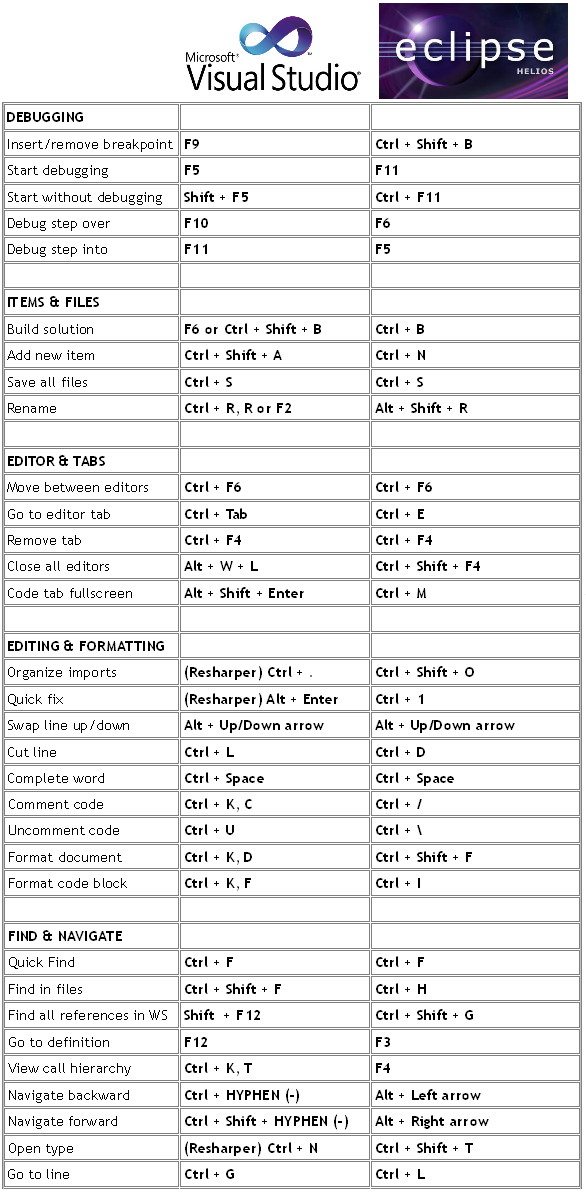
Most Useful Shortcuts for Visual Studio 2010 & Eclipse 3.6


Below is the most useful shortcuts for Visual Studio 2010 and Eclipse 3.6 Helios. Many of them are also available for every version of these editors:
Shortcuts for Visual Studio 2010 and Eclipse 3.6 Helios

Posted in | Leave a comment

10 Successful e-Book Search Engines


Below are 10 successful (with large e-book databases, easy to use and minimal design) e-book search engines:

1. Mega PDF


5. PDF Geni 


7. PDF SE 


10. Flazx

Posted in | 7 Comments